


Managing inventory in WooCommerce becomes challenging when multiple products share the same attribute — for example, several products available in the same color or material but stored as separate items.
A common question I get as a WooCommerce Developer and WordPress Custom Plugin Developer is:
How can multiple products share the same stock quantity based on an attribute like color or size?
In this guide, I’ll walk you through a custom WooCommerce solution that allows you to manage shared stock at the attribute level, instead of per product.
This approach is ideal for:
- Apparel stores (shared color stock)
- Manufacturing inventories
- Multi-product bundles
- Custom WooCommerce logic without bloated plugins
The Concept: Attribute-Level Stock Management
Let’s say:
- You sell multiple products
- Each product uses the attribute Color = Blue
- All “Blue” products should reduce from one shared stock pool
Instead of managing stock individually, we’ll store stock directly inside the attribute term itself.
This tutorial demonstrates how to:
- Add stock fields to WooCommerce attribute terms
- Display stock in the admin attribute list
- Override WooCommerce stock logic
- Reduce attribute stock after purchase
This is a custom WordPress + WooCommerce solution, typically built by a WooCommerce Developer or Full Stack Developer.
Step 1: Add Attribute Stock Custom Fields
We’ll store the stock quantity inside the attribute term using term meta.
Hooks Used
pa_color_edit_form_fieldsedited_pa_color
⚠️ Replace
pa_colorwith your attribute taxonomy if needed.
Code: Add Stock Field to Attribute Terms
<?php
add_action( 'pa_color_edit_form_fields', 'dk_attribute_stock_field', 25, 2 );

function dk_attribute_stock_field( $term ) {
	$stock_qty = get_term_meta( $term->term_id, '_stock_qty', true );
	?>
	<tr class="form-field">
		<th scope="row">
			<label for="stock_qty">Stock Quantity</label>
		</th>
		<td>
			<input type="number" name="stock_qty" id="stock_qty" value="<?php echo esc_attr( $stock_qty ); ?>">
		</td>
	</tr>
	<?php
}

add_action( 'edited_pa_color', 'dk_save_attribute_stock' );

function dk_save_attribute_stock( $term_id ) {
	$stock_qty = isset( $_POST['stock_qty'] ) ? absint( $_POST['stock_qty'] ) : 0;
	update_term_meta( $term_id, '_stock_qty', $stock_qty );
}
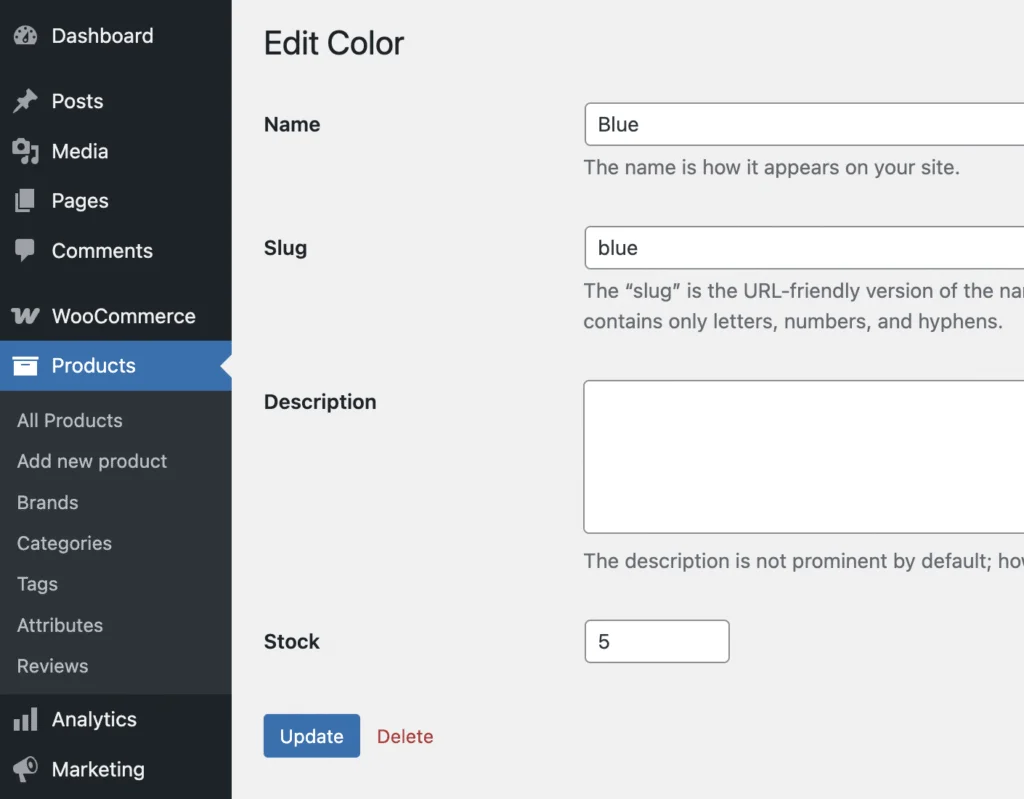
Now every Color attribute can have its own stock quantity.
Here is the result:
Step 2: Display Attribute Stock in Admin Columns
For better visibility, it’s helpful to see stock directly in the attribute list.
Kind of like this way:

Hooks Used
manage_edit-pa_color_columnsmanage_pa_color_custom_column
Code: Add Admin Column
add_filter( 'manage_edit-pa_color_columns', 'dk_add_stock_column' );
function dk_add_stock_column( $columns ) {
	$columns['stock_qty'] = 'Stock';
	return $columns;
}

add_action( 'manage_pa_color_custom_column', 'dk_display_stock_column', 10, 3 );
function dk_display_stock_column( $html, $column_name, $term_id ) {

	if ( 'stock_qty' === $column_name ) {
		$stock_qty = get_term_meta( $term_id, '_stock_qty', true );

		if ( $stock_qty > 0 ) {
			$html = "<mark class='instock'>In stock</mark> ({$stock_qty})";
		} else {
			$html = "<mark class='outofstock'>Out of stock</mark>";
		}
	}

	return $html;
}
This gives you a clear inventory snapshot inside WooCommerce.
Step 3: Override WooCommerce Product Stock Logic
Now comes the key part.
We want WooCommerce to use attribute stock instead of product stock.
Hook Used
woocommerce_product_get_stock_quantity
This example supports:
- Simple products only
- One attribute (Color)
- Shared stock logic
Code: Use Attribute Stock as Product Stock
add_filter( 'woocommerce_product_get_stock_quantity', 'dk_use_attribute_stock', 25, 2 );

function dk_use_attribute_stock( $stock_quantity, $product ) {

	if ( ! $product->is_type( 'simple' ) ) {
		return $stock_quantity;
	}

	$attribute_name = $product->get_attribute( 'pa_color' );
	if ( ! $attribute_name ) {
		return $stock_quantity;
	}

	$term = get_term_by( 'name', $attribute_name, 'pa_color' );
	if ( ! $term ) {
		return $stock_quantity;
	}

	$attribute_stock = get_term_meta( $term->term_id, '_stock_qty', true );
	if ( isset( $attribute_stock ) ) {
		$stock_quantity = $attribute_stock;
	}

	return $stock_quantity;
}
Result
The shared stock now applies across:
- Product pages
- Shop & category pages
- Cart & checkout
- Frontend availability checks
Step 4: Reduce Attribute Stock After Purchase
Stock must decrease when an order is placed.
Hooks Used
woocommerce_reduce_order_item_stockwoocommerce_restore_order_item_stock
Code: Reduce Attribute Stock on Purchase
add_action( 'woocommerce_reduce_order_item_stock', 'dk_reduce_attribute_stock', 25, 3 );

function dk_reduce_attribute_stock( $item, $change, $order ) {

	$product = $item->get_product();
	if ( ! $product || ! $product->is_type( 'simple' ) ) {
		return;
	}

	$attribute_name = $product->get_attribute( 'pa_color' );
	if ( ! $attribute_name ) {
		return;
	}

	$term = get_term_by( 'name', $attribute_name, 'pa_color' );
	if ( ! $term ) {
		return;
	}

	$current_stock = (int) get_term_meta( $term->term_id, '_stock_qty', true );
	$new_stock = max( 0, $current_stock - $change );

	update_term_meta( $term->term_id, '_stock_qty', $new_stock );
}
Now stock is accurately reduced across all products using that attribute.
Important Notes from a WooCommerce Developer
As a DK Gupta – WooCommerce Developer & Full Stack Developer, here are key considerations:
- This logic is best for simple products
- Variations require additional handling
- Attribute taxonomies must be consistent
- Custom logic should be wrapped in a plugin for maintainability
- Admin stock display can be disabled using
! is_admin()
This approach avoids:
- Duplicate SKU hacks
- Heavy inventory plugins
- Sync conflicts
- Performance bottlenecks
When Should You Use This Approach?
✅ Shared physical inventory
✅ Manufacturing-based products
✅ Color/Material-based stock
✅ Custom WooCommerce workflows
❌ Standard stores with isolated products
Final Thoughts
Shared attribute stock is not something WooCommerce supports out of the box — but with custom WordPress plugin development, it becomes both powerful and reliable.
This type of solution is typically built by an experienced:
- WooCommerce Developer
- WordPress Developer
- Full Stack Developer
- Custom Plugin Developer
If you need help implementing advanced WooCommerce inventory logic, custom plugins, or performance-focused solutions:
👉 Explore more at:
https://www.dk-gupta.com/

Hi and welcome! I’ve spent more than 7 years helping WordPress users with easy-to-follow guides, tutorials, and practical tips all completely free.Need expert developer help? I’m just a message away.